> ## Documentation Index
> Fetch the complete documentation index at: https://brightdata-ipv6-release.mintlify.site/llms.txt
> Use this file to discover all available pages before exploring further.

# Web Archive API

> Learn how to use the Web Archive API for accessing and retrieving data snapshots from Bright Data's cache, with delivery options to Amazon S3 or via webhook.

The Web Archive API allows you to access and retrieve Data Snapshots from Bright Data's cached data collections in a seamless and efficient method.

<Note>
  To access this API, you will need a Bright Data [API token](/general/account/api-token)
</Note>

## Run a Search

To initiate a search of our Web Archive, use the following `/search` endpoint.&#x20;
**Endpoint**: `POST api.brightdata.com/webarchive/search`

<Tabs>
  <Tab title="Request">
    ```js Request theme={null}
    POST api.brightdata.com/webarchive/search
    {
        filters: {
            max_age?: Duration,
            min_date?: yyyy-mm-dd,
            max_date?: yyyy-mm-dd,
            domain_whitelist?: ['example.com'],
            domain_blacklist?: ['example.com'],
            domain_regex_whitelist?: ['.*example..*'],
            domain_regex_blacklist?: ['.*example..*'],
            category_whitelist?: ['Automotive'],
            category_blacklist?: ['Automotive'],
            path_regex_whitelist?: ['.*/products/.*'],
            path_regex_blacklist?: ['.*/products/.*'],
            language_whitelist?: ['eng'], // ISO 639-3 letter language codes
            language_blacklist?: ['eng'],
            ip_country_whitelist?: ['us', 'ie', 'in'],
            ip_country_blacklist?: ['mx', 'ae', 'ca'],
            captcha?: true,
            robots_block?: true,
        }
    }
    ```
  </Tab>

  <Tab title="Response">
    <CodeGroup>
      ```js 200 OK theme={null}
      {search_id: <search_id>}
      ```

      ```js 400 Bad Request theme={null}
      // Error: example with incorrect filter usage
      {"error": "domain_blacklist cannot be used along with domain_whitelist"}
      ```
    </CodeGroup>
  </Tab>

  <Tab title="Code Example">
    <CodeGroup>
      ```sh Curl theme={null}
      curl -X POST https://api.brightdata.com/webarchive/search \
        -H "Authorization: Bearer $API_TOKEN" \
        -H 'Content-Type: application/json' \
        --data '{"filters": {"max_age": "1d", "domain_whitelist": ["example.com"]}}'
      ```

      ```python Python theme={null}
      import requests
      import json

      # Configuration
      BRIGHT_DATA_API_KEY = '$Enter_API_Token'
      BASE_URL = 'https://api.brightdata.com'
      WEBHOOK_URL = 'https://my-domain/webhook?id=XXX'

      HEADERS = {
          'Content-Type': 'application/json',
          'Authorization': f'Bearer {BRIGHT_DATA_API_KEY}'
      }

      def run_search():
          url = f'{BASE_URL}/webarchive/search'
          payload = {
              'filters': {
                  'max_age': '7d',
                  'language_whitelist': ['jpn'], #ISO 639-3 letter language codes
                  'category': 'Education'
                  'domain_regex_whitelist': ['.*.google..*']
              }
          }
          
          response = requests.post(url, headers=HEADERS, json=payload)
          try:
              response.raise_for_status()
              return response.json()
          except requests.exceptions.HTTPError as http_err:
              print(f"HTTP error occurred: {http_err}")
              print(f"Response Content: {response.text}")
              return None
          except requests.exceptions.RequestException as req_err:
              print(f"Request error occurred: {req_err}")
              print(f"Response Content: {response.text if response else 'No response content'}")
              return None
          except ValueError:
              print("Response content is not valid JSON")
              return None

      def main():
          search_response = run_search()
          if search_response:
              print(f"Search Response: {json.dumps(search_response, indent=2)}")
          else:
              print("Search failed.")

      if __name__ == "__main__":
          main()
      ```
    </CodeGroup>
  </Tab>

  <Tab title="Dictionary">
    Here is a brief explanation of each of the parameters you are able to use in your requests:

    | Parameter              | Description                                                                    |
    | ---------------------- | ------------------------------------------------------------------------------ |
    | max\_age               | Limits results to records collected within a specified time range.             |
    | min\_date              | Returns records collected on or after the specified date.                      |
    | max\_date              | Returns records collected on or before the specified date.                     |
    | domain\_whitelist      | Includes results only from listed domains.                                     |
    | domain\_blacklist      | Excludes results from listed domains.                                          |
    | category\_whitelist    | Includes results only from specified categories.                               |
    | category\_blacklist    | Excludes results from specified categories.                                    |
    | path\_regex\_whitelist | Includes results only matching the specified path regex.                       |
    | path\_regex\_blacklist | Excludes results matching the specified path regex.                            |
    | language\_whitelist    | Includes results only for specific language codes (ISO 639-3).                 |
    | language\_blacklist    | Excludes results for specific language codes.                                  |
    | ip\_country\_whitelist | Includes results collected through IPs or peers only from specified countries. |
    | ip\_country\_blacklist | Excludes results collected through IPs or peers from specified countries.      |
    | captcha                | Return only results with captcha triggered                                     |
    | robots\_block          | Return only results with robots block                                          |
  </Tab>
</Tabs>

<Note>
  You can run up to 100 searches per day without triggering a dump.
  Once you trigger a dump, that search no longer count against your limit.
</Note>

## Get Search Status

To check the status of a specific query that was made.&#x20;
**Endpoint**: `GET api.brightdata.com/webarchive/search/<search_id>`

When successful it will retrieve:

* The number of entries for your query

* The estimated size and cost of the full Data Snapshot

<Tabs>
  <Tab title="Request">
    ```js theme={null}
    GET api.brightdata.com/webarchive/search/<search_id>
    ```
  </Tab>

  <Tab title="Response">
    <Note>
      The status code of all three following responses is `200 OK`
    </Note>

    <CodeGroup>
      ```js Pending theme={null}
      {
          search_id: "ID",
          status: "in_progress"
      }
      ```

      ```js Success theme={null}
      {
          search_id: "ID",
          status: "done",
          files_count: 12341294,
          estimate_batch_count: 130,
          estimate_batch_bytes: 153151351,
          cpm_cost_usd: 0.02, // example cost per CPM
          dump_cost_usd: 100 // example total cost 
      }
      ```

      ```js Failed theme={null}
      {
          search_id: "ID",
          status: "failed",
          error: "Path regex filter caused non-retryable error"
      }
      ```
    </CodeGroup>
  </Tab>

  <Tab title="Code Example">
    <CodeGroup>
      ```sh Curl theme={null}
      curl https://api.brightdata.com/webarchive/search/$SEARCH_ID \
        -H "Authorization: Bearer $API_TOKEN"
      ```

      ```python Python theme={null}
      import requests
      import json

      # Configuration
      BRIGHT_DATA_API_KEY = '$Enter_API_Token'
      BASE_URL = 'https://api.brightdata.com'

      HEADERS = {
          'Authorization': f'Bearer {BRIGHT_DATA_API_KEY}'
      }

      def get_search_status(search_id):
          url = f'{BASE_URL}/webarchive/search/{search_id}'
          response = requests.get(url, headers=HEADERS)
          try:
              response.raise_for_status()
              return response.json()
          except requests.exceptions.HTTPError as http_err:
              print(f"HTTP error occurred: {http_err}")
              return None
          except requests.exceptions.RequestException as req_err:
              print(f"Request error occurred: {req_err}")
              return None
          except ValueError:
              print("Response content is not valid JSON")
              return None

      def main():
          search_id = input("Enter the search ID: ")
          status_response = get_search_status(search_id)
          
          if status_response:
              print(f"Status Response: {json.dumps(status_response, indent=2)}")
          else:
              print("Failed to retrieve search status.")

      if __name__ == "__main__":
          main()
      ```
    </CodeGroup>
  </Tab>
</Tabs>

## Get All Search Statuses

Check the status of all current searches.&#x20;
**Endpoint**: `GET api.brightdata.com/webarchive/searches`

<Tabs>
  <Tab title="Request">
    ```js theme={null}
    GET api.brightdat.com/webarchive/searches
    ```
  </Tab>

  <Tab title="Response">
    ```js 200 OK theme={null}
    [
        {
            search_id: "ID",
            status: "in_progress"
        },
        {
            search_id: "ID",
            status: "done"
        },
        // ... + rest of the searches and status
    }
    ```
  </Tab>

  <Tab title="Code Example">
    ```sh Curl theme={null}
    curl https://api.brightdata.com/webarchive/searches \
      -H "Authorization: Bearer $API_TOKEN"
    ```
  </Tab>
</Tabs>

## How data range affects delivery time

If your query is matching data within **last 72h** - your snapshot will start processing/delivering immediately.

If some of your matched data is **older than 72h** - it needs to be retrieved from a colder archive before delivery and it may take **up to 72h**.

<Note>
  We recommend using `max_age` = `1d` for initial testing.
</Note>

## Deliver Snapshot to Amazon S3 Storage

<Note>
  To use S3 storage delivery, you will first need to do the following:

  * Create an [AWS role](https://docs.aws.amazon.com/IAM/latest/UserGuide/id_roles_create_for-user_externalid.html) which gives Bright Data access to your system.

    * During this setup, you will be asked by Amazon for an “external ID” that is used with the role.

    * Your external ID for S3 is your Bright Data **Account ID** that can be found within [Account Settings](https://brightdata.com/cp/setting/customer_details)

  * Once a role is created, you will need to allow our system delivery role to `AssumeRole` that role.

    * Our system delivery role is: `arn:aws:iam::422310177405:role/brd.ec2.zs-dca-delivery`
</Note>

To deliver a specific Snapshot from a specific `search_id` to S3 storage, use the following `/dump` endpoint.&#x20;
**Endpoint**: `POST api.brightdata.com/webarchive/dump`

<Tabs>
  <Tab title="Request">
    <CodeGroup>
      ```js POST theme={null}
      POST api.brightdata.com/webarchive/dump
      {
          search_id: <search_id>,
          max_entries?: 1000000, // (optional) limit how many files you purchase
          delivery: {
              strategy: 's3',
      	    settings: {
                  bucket: <your_bucket_name>,
                  assume_role: {
                      role_arn: <role_you_created_above>,
                  },
              },
          },
      }

      ```
    </CodeGroup>
  </Tab>

  <Tab title="Response">
    ```js 200 OK theme={null}
    {dump_id: <dump_id>}
    ```
  </Tab>

  <Tab title="Code Example">
    <CodeGroup>
      ```sh Curl theme={null}
      curl -X POST https://api.brightdata.com/webarchive/dump \
        -H "Authorization: Bearer $API_TOKEN" \
        -H 'Content-Type: application/json' \
        --data @- <<EOF
      {
          "search_id": "$SEARCH_ID",
          "max_entries": 1000000,
          "delivery": {
              "strategy": "s3",
      	    "settings": {
                  "bucket": "$YOUR_BUCKET_NAME",
                  "assume_role": {
                      "role_arn": "$YOUR_DELIVERY_ROLE"
                  }
              }
          }
      }
      EOF
      ```

      ```python Python theme={null}
      import requests
      import json

      # Configuration
      BRIGHT_DATA_API_KEY = '$Enter_API_Token'
      BASE_URL = 'https://api.brightdata.com'

      HEADERS = {
          'Authorization': f'Bearer {BRIGHT_DATA_API_KEY}',
          'Content-Type': 'application/json'
      }

      def get_search_status(search_id):
          url = f'{BASE_URL}/webarchive/search/{search_id}'
          response = requests.get(url, headers=HEADERS)
          try:
              response.raise_for_status()
              return response.json()
          except requests.exceptions.HTTPError as http_err:
              print(f"HTTP error occurred: {http_err}")
              return None
          except requests.exceptions.RequestException as req_err:
              print(f"Request error occurred: {req_err}")
              return None
          except ValueError:
              print("Response content is not valid JSON")
              return None

      def deliver_snapshot_to_s3(search_id, bucket_name, role_arn, max_entries=1000000):
          url = f'{BASE_URL}/webarchive/dump'
          payload = {
              'search_id': search_id,
              'max_entries': max_entries,
              'delivery': {
                  'strategy': 's3',
                  'settings': {
                      'bucket': bucket_name,
                      'assume_role': {
                          'role_arn': role_arn,
                      },
                  },
              },
          }
          
          response = requests.post(url, headers=HEADERS, data=json.dumps(payload))
          try:
              response.raise_for_status()
              return response.json()
          except requests.exceptions.HTTPError as http_err:
              print(f"HTTP error occurred: {http_err}")
              return None
          except requests.exceptions.RequestException as req_err:
              print(f"Request error occurred: {req_err}")
              return None
          except ValueError:
              print("Response content is not valid JSON")
              return None

      def main():
          search_id = input("Enter the search ID: ")
          bucket_name = 'some-customer-provided-bucket-name-in-us-east-1'
          role_arn = 'some-customer-provided-aws-role-with-write-access-to-s3-bucket'
          
          status_response = get_search_status(search_id)
          
          if status_response:
              print(f"Status Response: {json.dumps(status_response, indent=2)}")
              delivery_response = deliver_snapshot_to_s3(search_id, bucket_name, role_arn)
              if delivery_response:
                  print(f"Delivery Response: {json.dumps(delivery_response, indent=2)}")
              else:
                  print("Failed to deliver snapshot to S3.")
          else:
              print("Failed to retrieve search status.")

      if __name__ == "__main__":
          main()
      ```
    </CodeGroup>
  </Tab>
</Tabs>

## Collect Snapshot via Webhook

Collect a Data Snapshot via webhook from a specific `search_id`&#x20;
**Endpoint**: `POST api.brightdata.com/webarchive/dump`

<Tabs>
  <Tab title="Request">
    ```js theme={null}
    {
        search_id: <search_id>,
        max_entries?: 1000000,
        delivery: {
    		strategy: 'webhook',
    		settings: {
                 url: string(),
                 auth?: string(), // will be added as an Authorization header
            },
        }
    }
    ```
  </Tab>

  <Tab title="Response">
    ```js 200 OK theme={null}
    {"dump_id": <dump_id>}
    ```
  </Tab>

  <Tab title="Code Example">
    <CodeGroup>
      ```sh Curl theme={null}
      curl -X POST https://api.brightdata.com/webarchive/dump \
        -H "Authorization: Bearer $API_TOKEN" \
        -H 'Content-Type: application/json' \
        --data @- <<EOF
      {
          "search_id": "$SEARCH_ID",
          "max_entries": 1000000,
          "delivery": {
              "strategy": "webhook",
      	    "settings": {
                  "url": "$YOUR_WEBHOOK_URL"
              }
          }
      }
      EOF
      ```

      ```python Python theme={null}
      import requests
      import json

      # Configuration
      BRIGHT_DATA_API_KEY = '$Enter_API_Token'
      BASE_URL = 'https://api.brightdata.com'

      HEADERS = {
          'Authorization': f'Bearer {BRIGHT_DATA_API_KEY}',
          'Content-Type': 'application/json'
      }

      def get_search_status(search_id):
          url = f'{BASE_URL}/webarchive/search/{search_id}'
          response = requests.get(url, headers=HEADERS)
          try:
              response.raise_for_status()
              return response.json()
          except requests.exceptions.HTTPError as http_err:
              print(f"HTTP error occurred: {http_err}")
              return None
          except requests.exceptions.RequestException as req_err:
              print(f"Request error occurred: {req_err}")
              return None
          except ValueError:
              print("Response content is not valid JSON")
              return None

      def deliver_snapshot_to_webhook(search_id, webhook_url, max_entries=1000000):
          url = f'{BASE_URL}/webarchive/dump'
          payload = {
              'search_id': search_id,
              'max_entries': max_entries,
              'delivery': {
                  'strategy': 'webhook',
                  'settings': {
                      'url': webhook_url
                  },
              },
          }
          
          response = requests.post(url, headers=HEADERS, data=json.dumps(payload))
          try:
              response.raise_for_status()
              return response.json()
          except requests.exceptions.HTTPError as http_err:
              print(f"HTTP error occurred: {http_err}")
              return None
          except requests.exceptions.RequestException as req_err:
              print(f"Request error occurred: {req_err}")
              return None
          except ValueError:
              print("Response content is not valid JSON")
              return None

      def main():
          search_id = input("Enter the search ID: ")
          webhook_url = 'https://example.com/webhook'
          status_response = get_search_status(search_id)
          if status_response:
              print(f"Status Response: {json.dumps(status_response, indent=2)}")
              delivery_response = deliver_snapshot_to_webhook(search_id, webhook_url)
              if delivery_response:
                  print(f"Delivery Response: {json.dumps(delivery_response, indent=2)}")
              else:
                  print("Failed to deliver snapshot to S3.")
          else:
              print("Failed to retrieve search status.")

      if __name__ == "__main__":
          main()
      ```
    </CodeGroup>
  </Tab>
</Tabs>

## Get Status of Data Snapshot

Check the status of a specific Data Snapshot (dump) using the dump\_id.&#x20;
**Endpoint**: `GET api.brightdata.com/webarchive/dump/<dump_id>`

<Tabs>
  <Tab title="Request">
    ```js theme={null}
    GET api.brightdata.com/webarchive/dump/<dump_id>
    ```
  </Tab>

  <Tab title="Response">
    <Note>
      The status code of all three following responses is `200 OK`
    </Note>

    <CodeGroup>
      ```js In progress theme={null}
      {
          dump_id: <id>,
          status: 'in_progress',
          batches_total: 130,
          batches_uploaded: 29,
          files_total: 1241241251,
          estimate_finish: ISODate
      }
      ```

      ```js Finished theme={null}
      {
          dump_id: <id>,
          status: 'done',
          batches_total: 130,
          files_total: 1241241251,
          files_uploaded: 2412515,
          completed_at: Date
      }
      ```

      ```js Failed theme={null}
      {
          dump_id: <id>,
          status: 'failed',
          error: 'Designated delivery path not responding'
      }
      ```
    </CodeGroup>
  </Tab>

  <Tab title="Code Example">
    ```sh Curl theme={null}
    curl https://api.brightdata.com/webarchive/dump/$DUMP_ID \
      -H "Authorization: Bearer $API_TOKEN"
    ```
  </Tab>
</Tabs>

## Get the Status of all Data Snapshots

**Endpoint**: `GET api.brightdata.com/webarchive/dumps`

<Tabs>
  <Tab title="Response">
    ```js 200 OK theme={null}
    [
        {
            dump_id: 'ID',
            status: 'in_progress',
            batches_total: 130,
            batches_uploaded: 29,
            files_total: 1241241251,
            estimate_finish: Date
        },
        {
            dump_id: 'ID',
            status: 'done',
            batches_total: 130,
            files_total: 1241241251,
            files_uploaded: 2412515,
            completed_at: Date
        }
        // ... rest of the dumps
    ]
    ```
  </Tab>

  <Tab title="Code Example">
    ```sh Curl theme={null}
    curl https://api.brightdata.com/webarchive/dumps \
      -H "Authorization: Bearer $API_TOKEN"
    ```
  </Tab>
</Tabs>

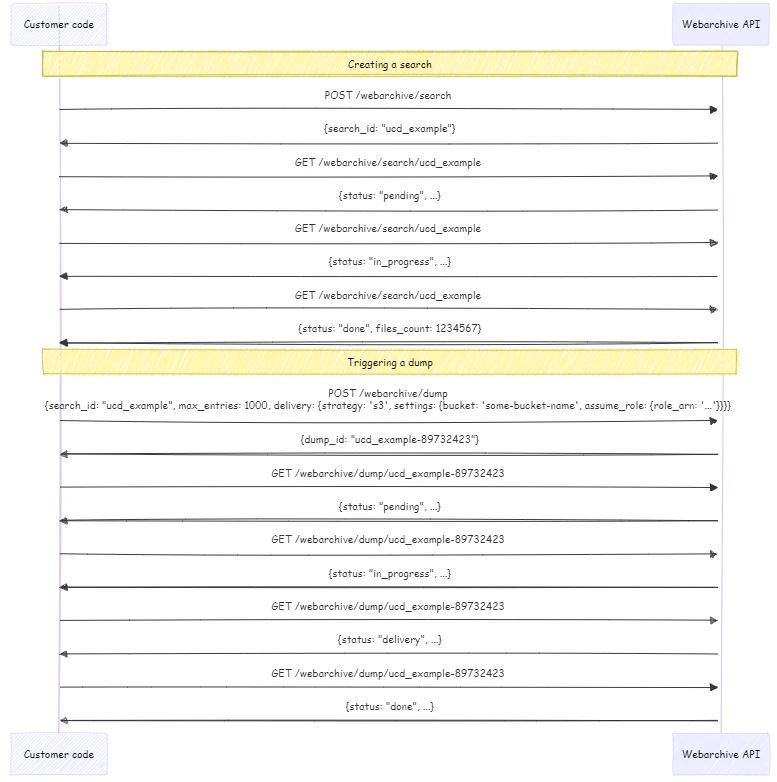
## High-level process flow diagram

<img src="https://mintcdn.com/brightdata-ipv6-release/I-B63f0As5k5UeY2/images/api-reference/webarchive/webarchive-flow.png?fit=max&auto=format&n=I-B63f0As5k5UeY2&q=85&s=8f2268b58756d153c6207743b000ee26" alt="flow diagram" width="777" height="782" data-path="images/api-reference/webarchive/webarchive-flow.png" />