> ## Documentation Index
> Fetch the complete documentation index at: https://brightdata-ipv6-release.mintlify.site/llms.txt
> Use this file to discover all available pages before exploring further.

# 快速入门 Guide for Bright Data's Web Unlocker

> Get started with Bright Data's Web Unlocker quickly. Follow our step-by-step guide to set up your proxy and start collecting data today.

<Tip>
  如果您尚未注册Bright Data，可以免费注册 ，在添加付款方式后，即可获得5美元的信用额度以开始使用！\
  [https://brightdata.com/](https://brightdata.com/)
</Tip>

<Steps>
  <Step title={<a href="https://brightdata.com/cp/start">登录</a>} />

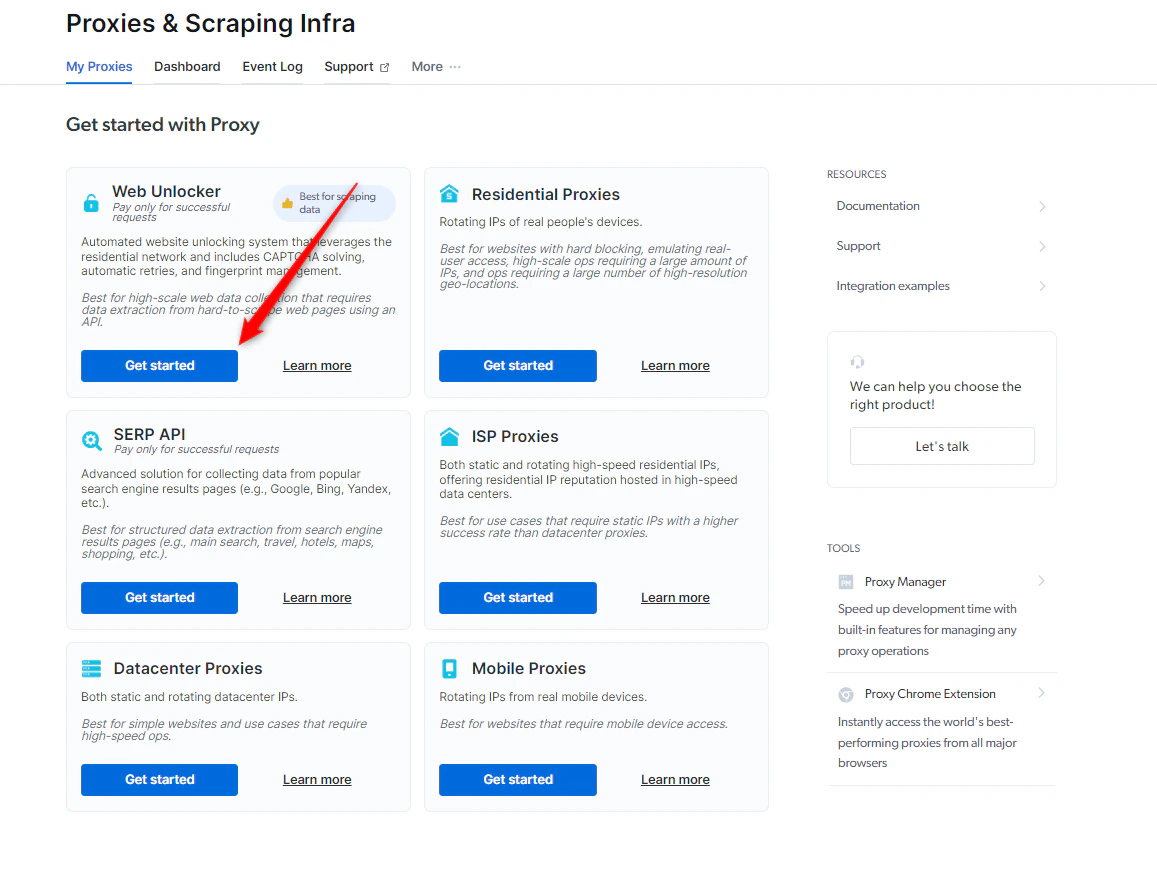
  <Step title="导航到“我的区域”">
    <Accordion title="在“我的区域”视图中，点击在Web Unlocker下的“开始”">
      <Warning>
        如果您已经有正在运行的代理，只需在右上角选择添加即可
      </Warning>

      <Frame>
        <img src="https://mintcdn.com/brightdata-ipv6-release/7h0Rp1QdWtN2ThzS/images/scraping-automation/web-unlocker/quick-start/get-started.png?fit=max&auto=format&n=7h0Rp1QdWtN2ThzS&q=85&s=1022ede2c7dc8d907b79863be75ee0a0" alt="开始" width="1157" height="888" data-path="images/scraping-automation/web-unlocker/quick-start/get-started.png" />
      </Frame>
    </Accordion>
  </Step>

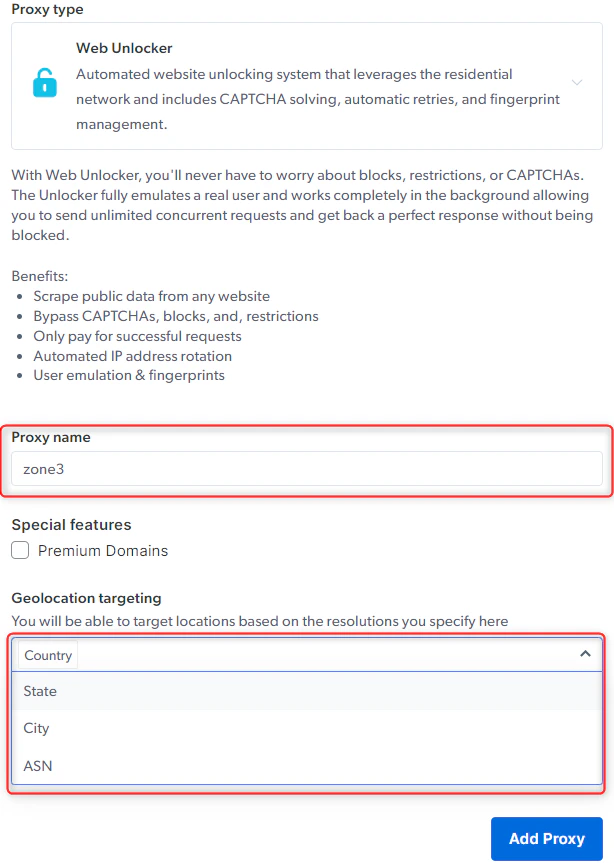
  <Step title="选择Web Unlocker名称">
    <Accordion title="输入新Web Unlocker的代理名称">
      <Warning>
        请选择一个有意义的名称，因为区域名称在创建后就无法更改。
      </Warning>

      <Frame>
        <img src="https://mintcdn.com/brightdata-ipv6-release/7h0Rp1QdWtN2ThzS/images/scraping-automation/web-unlocker/quick-start/proxy-name.png?fit=max&auto=format&n=7h0Rp1QdWtN2ThzS&q=85&s=d10680cce6c55059cc7d2a56bd4be15e" alt="代理名称" width="614" height="863" data-path="images/scraping-automation/web-unlocker/quick-start/proxy-name.png" />
      </Frame>
    </Accordion>
  </Step>

  <Step title="点击“添加代理”" />
</Steps>

<Accordion title="在继续之前，请验证您的账户">
  如果您尚未添加付款方式，此时系统会提示您添加付款方式以验证您的账户。如果您是第一次使用Bright Data，您还将获得5美元的奖励信用额度，帮助您开始使用！

  <Tip>
    这仅用于验证目的，此时不会向您收取任何费用
  </Tip>
</Accordion>

<Note>
  别担心，我们将在下一节配置中介绍所有配置。

  [配置](/cn/scraping-automation/web-unlocker/configuration).
</Note>