> ## Documentation Index
> Fetch the complete documentation index at: https://brightdata-ipv6-release.mintlify.site/llms.txt
> Use this file to discover all available pages before exploring further.

# 网络存档 API（测试版）

> 了解如何使用网络存档 API（测试版）访问 Bright Data 的缓存并从中检索数据快照，然后通过 Amazon S3 或 webhook 交付数据。

网络存档 API 让您可以顺畅、高效地访问 Bright Data 采集的缓存数据并从中检索数据快照。

<Note>
  如想访问此 API，您需拥有 Bright Data API 令牌 \
  [API token](/cn/general/account/api-token)
</Note>

## 运行搜索请求

要开始搜索我们的网络存档，请使用以下 `/search` 端点。 \
**端点**: `POST api.brightdata.com/webarchive/search`

<Tabs>
  <Tab title="请求">
    ```js 请求 theme={null}
    POST api.brightdata.com/webarchive/search
    {
        filters: {
            max_age?: Duration,
            min_date?: yyyy-mm-dd,
            max_date?: yyyy-mm-dd,
            domain_whitelist?: ['example.com'],
            domain_blacklist?: ['example.com'],
            domain_regex_whitelist?: ['.*example..*'],
            domain_regex_blacklist?: ['.*example..*'],
            category_whitelist?: ['Automotive'],
            category_blacklist?: ['Automotive'],
            path_regex_whitelist?: ['.*/products/.*'],
            path_regex_blacklist?: ['.*/products/.*'],
            language_whitelist?: ['eng'], //ISO 639-3 letter language codes
            language_blacklist?: ['eng'],
            ip_country_whitelist?: ['us', 'ie', 'in'],
            ip_country_blacklist?: ['mx', 'ae', 'ca']
        }
    }
    ```
  </Tab>

  <Tab title="响应">
    <CodeGroup>
      ```js 200 OK theme={null}
      {search_id: <search_id>}
      ```

      ```js 400 Bad 请求 theme={null}
      // Error: example with incorrect filter usage
      {"error": "domain_blacklist cannot be used along with domain_whitelist"}
      ```
    </CodeGroup>
  </Tab>

  <Tab title="代码示例">
    <CodeGroup>
      ```sh Curl theme={null}
      curl -X POST https://api.brightdata.com/webarchive/search \
        -H "Authorization: Bearer $API_TOKEN" \
        -H 'Content-Type: application/json' \
        --data '{"filters": {"max_age": "1d", "domain_whitelist": ["example.com"]}}'
      ```

      ```python Python theme={null}
      import requests
      import json

      # Configuration
      BRIGHT_DATA_API_KEY = '$Enter_API_Token'
      BASE_URL = 'https://api.brightdata.com'
      WEBHOOK_URL = 'https://my-domain/webhook?id=XXX'

      HEADERS = {
          'Content-Type': 'application/json',
          'Authorization': f'Bearer {BRIGHT_DATA_API_KEY}'
      }

      def run_search():
          url = f'{BASE_URL}/webarchive/search'
          payload = {
              'filters': {
                  'max_age': '7d',
                  'language_whitelist': ['jpn'], #ISO 639-3 letter language codes
                  'category': 'Education'
                  'domain_regex_whitelist': ['.*.google..*']
              }
          }
          
          response = requests.post(url, headers=HEADERS, json=payload)
          try:
              response.raise_for_status()
              return response.json()
          except requests.exceptions.HTTPError as http_err:
              print(f"HTTP error occurred: {http_err}")
              print(f"响应 Content: {response.text}")
              return None
          except requests.exceptions.请求Exception as req_err:
              print(f"请求 error occurred: {req_err}")
              print(f"响应 Content: {response.text if response else 'No response content'}")
              return None
          except ValueError:
              print("响应 content is not valid JSON")
              return None

      def main():
          search_response = run_search()
          if search_response:
              print(f"搜索 响应: {json.dumps(search_response, indent=2)}")
          else:
              print("搜索 failed.")

      if __name__ == "__main__":
          main()
      ```
    </CodeGroup>
  </Tab>

  <Tab title="Dictionary">
    Here is a brief explanation of each of the parameters you are able to use in your requests:

    | Parameter              | Description                                                               |
    | ---------------------- | ------------------------------------------------------------------------- |
    | max\_age               | Limits results to records collected within a specified time range.        |
    | min\_date              | Returns records collected on or after the specified date.                 |
    | max\_date              | Returns records collected on or before the specified date.                |
    | domain\_whitelist      | Includes results only from listed domains.                                |
    | domain\_blacklist      | Excludes results from listed domains.                                     |
    | category\_whitelist    | Includes results from specified categories.                               |
    | category\_blacklist    | Excludes results from specified categories.                               |
    | path\_regex\_whitelist | Includes results matching the specified path regex.                       |
    | path\_regex\_blacklist | Excludes results matching the specified path regex.                       |
    | language\_whitelist    | Includes results for specific language codes (ISO 639-3).                 |
    | language\_blacklist    | Excludes results for specific language codes.                             |
    | ip\_country\_whitelist | Includes results collected through IPs or peers from specified countries. |
    | ip\_country\_blacklist | Excludes results collected through IPs or peers from specified countries. |
  </Tab>
</Tabs>

<Note>
  Your search cannot cover a date range of more than 7d. If you need to query a longer period than this, please contact your account manager.
</Note>

<Note>
  You can run 5 searches per day without triggering a dump.
  Once you trigger a dump, that search no longer count against your limit.
</Note>

## 获取搜索状态

查看已进行的特定查询的状态。 \
**端点**: `GET api.brightdata.com/webarchive/search/<search_id>`

调用成功后它将检索：

* 您查询的条目数量
* 完整数据快照的大小和成本的估算值

<Tabs>
  <Tab title="请求">
    ```js theme={null}
    GET api.brightdata.com/webarchive/search/<search_id>
    ```
  </Tab>

  <Tab title="响应">
    <Note>
      The status code of all three following responses is `200 OK`
    </Note>

    <CodeGroup>
      ```js Pending theme={null}
      {
          search_id: "ID",
          status: "in_progress"
      }
      ```

      ```js Success theme={null}
      {
          search_id: "ID",
          status: "done",
          files_count: 12341294,
          estimate_batch_count: 130,
          estimate_batch_bytes: 153151351,
          cpm_cost_usd: 0.02, // example cost per CPM
          dump_cost_usd: 100 // example total cost 
      }
      ```

      ```js Failed theme={null}
      {
          search_id: "ID",
          status: "failed",
          error: "Path regex filter caused non-retryable error"
      }
      ```
    </CodeGroup>
  </Tab>

  <Tab title="代码示例">
    <CodeGroup>
      ```sh Curl theme={null}
      curl https://api.brightdata.com/webarchive/search/$SEARCH_ID \
        -H "Authorization: Bearer $API_TOKEN"
      ```

      ```python Python theme={null}
      import requests
      import json

      # Configuration
      BRIGHT_DATA_API_KEY = '$Enter_API_Token'
      BASE_URL = 'https://api.brightdata.com'

      HEADERS = {
          'Authorization': f'Bearer {BRIGHT_DATA_API_KEY}'
      }

      def get_search_status(search_id):
          url = f'{BASE_URL}/webarchive/search/{search_id}'
          response = requests.get(url, headers=HEADERS)
          try:
              response.raise_for_status()
              return response.json()
          except requests.exceptions.HTTPError as http_err:
              print(f"HTTP error occurred: {http_err}")
              return None
          except requests.exceptions.请求Exception as req_err:
              print(f"请求 error occurred: {req_err}")
              return None
          except ValueError:
              print("响应 content is not valid JSON")
              return None

      def main():
          search_id = input("Enter the search ID: ")
          status_response = get_search_status(search_id)
          
          if status_response:
              print(f"Status 响应: {json.dumps(status_response, indent=2)}")
          else:
              print("Failed to retrieve search status.")

      if __name__ == "__main__":
          main()
      ```
    </CodeGroup>
  </Tab>
</Tabs>

## 获取所有搜索状态

检查当前所有搜索的状态。 \
**Endpoint**: `GET api.brightdata.com/webarchive/searches`

<Tabs>
  <Tab title="请求">
    ```js theme={null}
    GET api.brightdat.com/webarchive/searches
    ```
  </Tab>

  <Tab title="响应">
    ```js 200 OK theme={null}
    [
        {
            search_id: "ID",
            status: "in_progress"
        },
        {
            search_id: "ID",
            status: "done"
        },
        // ... + rest of the searches and status
    }
    ```
  </Tab>

  <Tab title="代码示例">
    ```sh Curl theme={null}
    curl https://api.brightdata.com/webarchive/searches \
      -H "Authorization: Bearer $API_TOKEN"
    ```
  </Tab>
</Tabs>

## 将快照传送至 Amazon S3 Storage

<Note>
  要使用 S3 存储服务交付数据，您首先需要执行以下操作：

  * 创建一个可访问 Bright Data 系统的 AWS 角色: [https://docs.aws.amazon.com/IAM/latest/UserGuide/id\_roles\_create\_for-user\_externalid.html](https://docs.aws.amazon.com/IAM/latest/UserGuide/id_roles_create_for-user_externalid.html)
    * 在此设置过程中，Amazon 会要求您提供与该角色一起使用的“外部 ID”。
    * 您的 S3 外部 ID 就是您的 Bright Data 账户 ID，可在“账户设置”中找到: [https://brightdata.com/cp/setting/customer\_details](https://brightdata.com/cp/setting/customer_details)
  * 创建角色后，您需允许我们的系统交付角色通过 AssumeRole 操作访问该角色。
    * 我们的系统交付角色是：arn:aws:iam::422310177405:role/brd.ec2.zs-dca-delivery
</Note>

要将特定 `search_id` 中的特定快照传送至 S3 存储服务平台，请使用以下 `/dump` 端点。\
**Endpoint**: `POST api.brightdata.com/webarchive/dump`

<Tabs>
  <Tab title="请求">
    <CodeGroup>
      ```js POST theme={null}
      POST api.brightdata.com/webarchive/dump
      {
          search_id: <search_id>,
          max_entries?: 1000000, // (optional) limit how many files you purchase
          delivery: {
              strategy: 's3',
      	    settings: {
                  bucket: <your_bucket_name>,
                  assume_role: {
                      role_arn: <role_you_created_above>,
                  },
              },
          },
      }

      ```
    </CodeGroup>
  </Tab>

  <Tab title="响应">
    ```js 200 OK theme={null}
    {dump_id: <dump_id>}
    ```
  </Tab>

  <Tab title="代码示例">
    <CodeGroup>
      ```sh Curl theme={null}
      curl -X POST https://api.brightdata.com/webarchive/dump \
        -H "Authorization: Bearer $API_TOKEN" \
        -H 'Content-Type: application/json' \
        --data @- <<EOF
      {
          "search_id": "$SEARCH_ID",
          "max_entries": 1000000,
          "delivery": {
              "strategy": "s3",
      	    "settings": {
                  "bucket": "$YOUR_BUCKET_NAME",
                  "assume_role": {
                      "role_arn": "$YOUR_DELIVERY_ROLE"
                  }
              }
          }
      }
      EOF
      ```

      ```python Python theme={null}
      import requests
      import json

      # Configuration
      BRIGHT_DATA_API_KEY = '$Enter_API_Token'
      BASE_URL = 'https://api.brightdata.com'

      HEADERS = {
          'Authorization': f'Bearer {BRIGHT_DATA_API_KEY}',
          'Content-Type': 'application/json'
      }

      def get_search_status(search_id):
          url = f'{BASE_URL}/webarchive/search/{search_id}'
          response = requests.get(url, headers=HEADERS)
          try:
              response.raise_for_status()
              return response.json()
          except requests.exceptions.HTTPError as http_err:
              print(f"HTTP error occurred: {http_err}")
              return None
          except requests.exceptions.请求Exception as req_err:
              print(f"请求 error occurred: {req_err}")
              return None
          except ValueError:
              print("响应 content is not valid JSON")
              return None

      def deliver_snapshot_to_s3(search_id, bucket_name, role_arn, max_entries=1000000):
          url = f'{BASE_URL}/webarchive/dump'
          payload = {
              'search_id': search_id,
              'max_entries': max_entries,
              'delivery': {
                  'strategy': 's3',
                  'settings': {
                      'bucket': bucket_name,
                      'assume_role': {
                          'role_arn': role_arn,
                      },
                  },
              },
          }
          
          response = requests.post(url, headers=HEADERS, data=json.dumps(payload))
          try:
              response.raise_for_status()
              return response.json()
          except requests.exceptions.HTTPError as http_err:
              print(f"HTTP error occurred: {http_err}")
              return None
          except requests.exceptions.请求Exception as req_err:
              print(f"请求 error occurred: {req_err}")
              return None
          except ValueError:
              print("响应 content is not valid JSON")
              return None

      def main():
          search_id = input("Enter the search ID: ")
          bucket_name = 'some-customer-provided-bucket-name-in-us-east-1'
          role_arn = 'some-customer-provided-aws-role-with-write-access-to-s3-bucket'
          
          status_response = get_search_status(search_id)
          
          if status_response:
              print(f"Status 响应: {json.dumps(status_response, indent=2)}")
              delivery_response = deliver_snapshot_to_s3(search_id, bucket_name, role_arn)
              if delivery_response:
                  print(f"Delivery 响应: {json.dumps(delivery_response, indent=2)}")
              else:
                  print("Failed to deliver snapshot to S3.")
          else:
              print("Failed to retrieve search status.")

      if __name__ == "__main__":
          main()
      ```
    </CodeGroup>
  </Tab>
</Tabs>

## 通过 Webhook 采集快照

通过 Webhook 从特定的 `search_id` 采集数据快照

**端点**: `POST api.brightdata.com/cache/dump`

<Tabs>
  <Tab title="请求">
    ```js theme={null}
    {
        search_id: <search_id>,
        max_entries?: 1000000,
        delivery: {
    		strategy: 'webhook',
    		settings: {
                 url: string(),
                 auth?: string(), // will be added as an Authorization header
            },
        }
    }
    ```
  </Tab>

  <Tab title="响应">
    ```js 200 OK theme={null}
    {"dump_id": <dump_id>}
    ```
  </Tab>

  <Tab title="代码示例">
    <CodeGroup>
      ```sh Curl theme={null}
      curl -X POST https://api.brightdata.com/webarchive/dump \
        -H "Authorization: Bearer $API_TOKEN" \
        -H 'Content-Type: application/json' \
        --data @- <<EOF
      {
          "search_id": "$SEARCH_ID",
          "max_entries": 1000000,
          "delivery": {
              "strategy": "webhook",
      	    "settings": {
                  "url": "$YOUR_WEBHOOK_URL"
              }
          }
      }
      EOF
      ```

      ```python Python theme={null}
      import requests
      import json

      # Configuration
      BRIGHT_DATA_API_KEY = '$Enter_API_Token'
      BASE_URL = 'https://api.brightdata.com'

      HEADERS = {
          'Authorization': f'Bearer {BRIGHT_DATA_API_KEY}',
          'Content-Type': 'application/json'
      }

      def get_search_status(search_id):
          url = f'{BASE_URL}/webarchive/search/{search_id}'
          response = requests.get(url, headers=HEADERS)
          try:
              response.raise_for_status()
              return response.json()
          except requests.exceptions.HTTPError as http_err:
              print(f"HTTP error occurred: {http_err}")
              return None
          except requests.exceptions.请求Exception as req_err:
              print(f"请求 error occurred: {req_err}")
              return None
          except ValueError:
              print("响应 content is not valid JSON")
              return None

      def deliver_snapshot_to_webhook(search_id, webhook_url, max_entries=1000000):
          url = f'{BASE_URL}/webarchive/dump'
          payload = {
              'search_id': search_id,
              'max_entries': max_entries,
              'delivery': {
                  'strategy': 'webhook',
                  'settings': {
                      'url': webhook_url
                  },
              },
          }
          
          response = requests.post(url, headers=HEADERS, data=json.dumps(payload))
          try:
              response.raise_for_status()
              return response.json()
          except requests.exceptions.HTTPError as http_err:
              print(f"HTTP error occurred: {http_err}")
              return None
          except requests.exceptions.请求Exception as req_err:
              print(f"请求 error occurred: {req_err}")
              return None
          except ValueError:
              print("响应 content is not valid JSON")
              return None

      def main():
          search_id = input("Enter the search ID: ")
          webhook_url = 'https://example.com/webhook'
          status_response = get_search_status(search_id)
          if status_response:
              print(f"Status 响应: {json.dumps(status_response, indent=2)}")
              delivery_response = deliver_snapshot_to_webhook(search_id, webhook_url)
              if delivery_response:
                  print(f"Delivery 响应: {json.dumps(delivery_response, indent=2)}")
              else:
                  print("Failed to deliver snapshot to S3.")
          else:
              print("Failed to retrieve search status.")

      if __name__ == "__main__":
          main()
      ```
    </CodeGroup>
  </Tab>
</Tabs>

## 获取数据快照的状态

使用 dump\_id 查看特定数据快照（转储）的状态。 \
**端点**: `GET api.brightdata.com/webarchive/dump/<dump_id>`

<Tabs>
  <Tab title="请求">
    ```js theme={null}
    GET api.brightdata.com/webarchive/dump/<dump_id>
    ```
  </Tab>

  <Tab title="响应">
    <Note>
      The status code of all three following responses is `200 OK`
    </Note>

    <CodeGroup>
      ```js In progress theme={null}
      {
          dump_id: <id>,
          status: 'in_progress',
          batches_total: 130,
          batches_uploaded: 29,
          files_total: 1241241251,
          estimate_finish: ISODate
      }
      ```

      ```js Finished theme={null}
      {
          dump_id: <id>,
          status: 'done',
          batches_total: 130,
          files_total: 1241241251,
          files_uploaded: 2412515,
          completed_at: Date
      }
      ```

      ```js Failed theme={null}
      {
          dump_id: <id>,
          status: 'failed',
          error: 'Designated delivery path not responding'
      }
      ```
    </CodeGroup>
  </Tab>

  <Tab title="代码示例">
    ```sh Curl theme={null}
    curl https://api.brightdata.com/webarchive/dump/$DUMP_ID \
      -H "Authorization: Bearer $API_TOKEN"
    ```
  </Tab>
</Tabs>

## 获取所有数据快照的状态

**端点**: `GET api.brightdata.com/webarchive/dumps`

<Tabs>
  <Tab title="响应">
    ```js 200 OK theme={null}
    [
        {
            dump_id: 'ID',
            status: 'in_progress',
            batches_total: 130,
            batches_uploaded: 29,
            files_total: 1241241251,
            estimate_finish: Date
        },
        {
            dump_id: 'ID',
            status: 'done',
            batches_total: 130,
            files_total: 1241241251,
            files_uploaded: 2412515,
            completed_at: Date
        }
        // ... rest of the dumps
    ]
    ```
  </Tab>

  <Tab title="代码示例">
    ```sh Curl theme={null}
    curl https://api.brightdata.com/webarchive/dumps \
      -H "Authorization: Bearer $API_TOKEN"
    ```
  </Tab>
</Tabs>

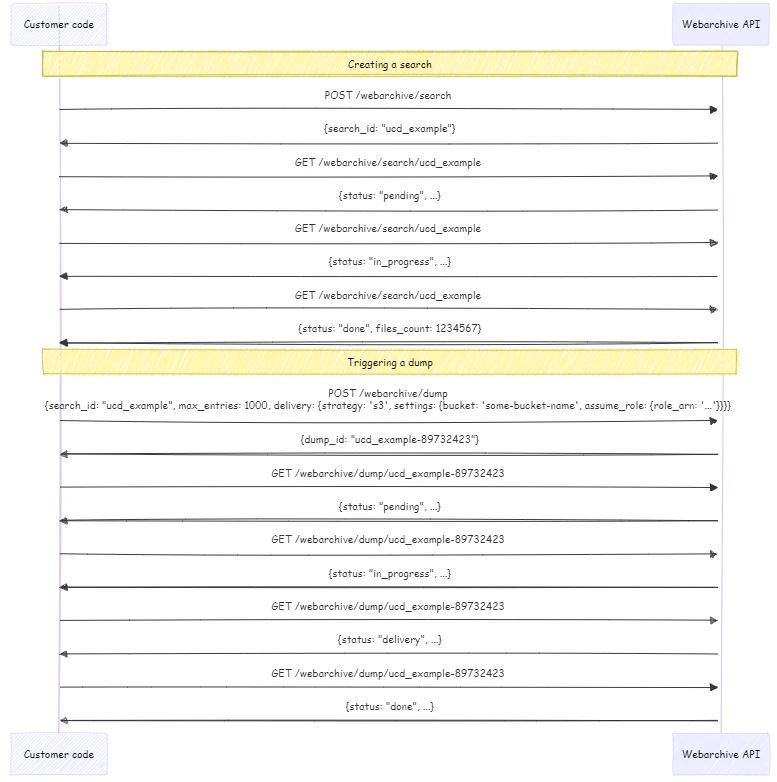
## High-level process flow diagram

<img src="https://mintcdn.com/brightdata-ipv6-release/I-B63f0As5k5UeY2/images/api-reference/webarchive/webarchive-flow.png?fit=max&auto=format&n=I-B63f0As5k5UeY2&q=85&s=8f2268b58756d153c6207743b000ee26" alt="flow diagram" width="777" height="782" data-path="images/api-reference/webarchive/webarchive-flow.png" />