> ## Documentation Index
> Fetch the complete documentation index at: https://brightdata-ipv6-release.mintlify.site/llms.txt
> Use this file to discover all available pages before exploring further.
# 如何配置您的数据中心代理
创建代理后,您可以导航到配置选项卡来配置代理设置。
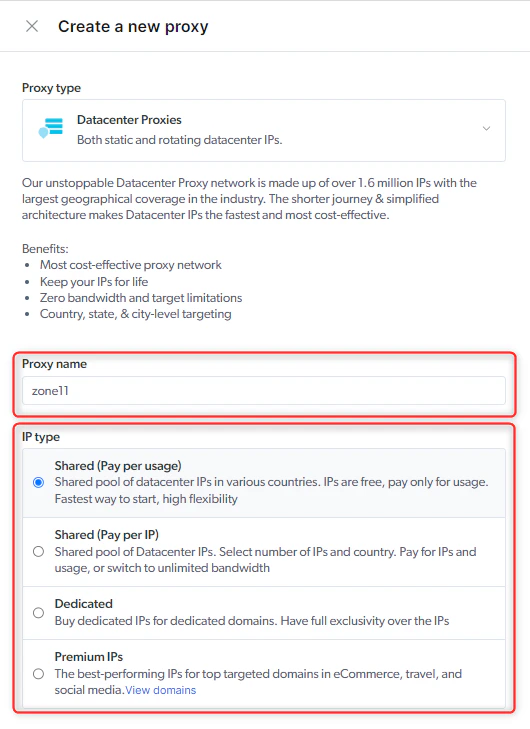 ## IP 类型
**为您的代理区域选择两种 IP 类型之一:**
选择 IP 数量和国家/地区。 按 IP 和使用量付费。
当您需要具有成本效益的选项,并且不需要 IP 专用权时。
多个用户共享 IP
拥有来自所有国家/地区的 1 万个 IP 的固定资源池。IP 免费。 按使用量付费。
当您需要具有成本效益的选项,并且不需要 IP 独占权时。These proxies will rotate so every request you can get a new IP address ("Rotating proxies").
多个用户共享 IP
当您需要使用专用 IP 地址访问网站时。
IP 仅供您使用。
~~电子商务、旅游和社交媒体域名等领域最知名的 IP。~~
已弃用: 我们不再提供高级 IP
***
## IP 数量
作为可用 IP 资源池分配的 IP 数量。
请注意,增加数量会增加额外成本。
## 分配的 IP
您可以查看或下载分配给您的 IP。
## IP 类型
**为您的代理区域选择两种 IP 类型之一:**
选择 IP 数量和国家/地区。 按 IP 和使用量付费。
当您需要具有成本效益的选项,并且不需要 IP 专用权时。
多个用户共享 IP
拥有来自所有国家/地区的 1 万个 IP 的固定资源池。IP 免费。 按使用量付费。
当您需要具有成本效益的选项,并且不需要 IP 独占权时。These proxies will rotate so every request you can get a new IP address ("Rotating proxies").
多个用户共享 IP
当您需要使用专用 IP 地址访问网站时。
IP 仅供您使用。
~~电子商务、旅游和社交媒体域名等领域最知名的 IP。~~
已弃用: 我们不再提供高级 IP
***
## IP 数量
作为可用 IP 资源池分配的 IP 数量。
请注意,增加数量会增加额外成本。
## 分配的 IP
您可以查看或下载分配给您的 IP。
 ***
## 地理位置定位
Common setup is to create a zone per each location, this way you can control your requests target on the zone level.
For example: dcshared-uk, dcshared-us, dcshared-de.
### 专用 and Pay per IP proxies
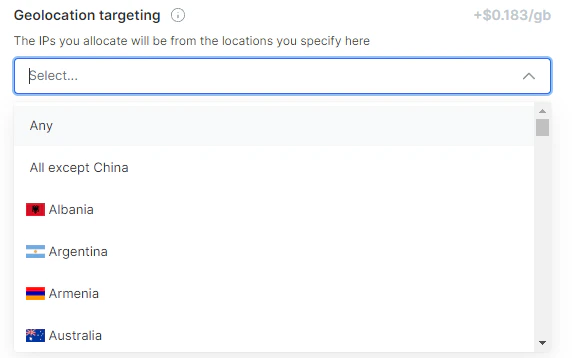
地理位置定位允许您定位特定的国家/地区。
从下拉菜单中选择首选国家/地区。
If you select multiple countries, we assign proxies distributed evenly across the countries you selected.
***
## 地理位置定位
Common setup is to create a zone per each location, this way you can control your requests target on the zone level.
For example: dcshared-uk, dcshared-us, dcshared-de.
### 专用 and Pay per IP proxies
地理位置定位允许您定位特定的国家/地区。
从下拉菜单中选择首选国家/地区。
If you select multiple countries, we assign proxies distributed evenly across the countries you selected.
 ### Shared proxy
In Datacenter Shared proxies, you have access to 40,000 proxies around the globe. To target specific country, use the flag -country in the proxy user name parameter with an ISO-3166 country code.
[FAQ: Where can I see the list of country codes?](https://docs.brightdata.com/cn/general/faqs#where-can-i-see-the-list-of-country-codes)
***
## 缓存代理
Bright Data 的缓存代理是一项旨在减少目标站点不必要负载的功能,一方面允许客户缓存成功结果,另一方面,在可能的情况下根据请求接收缓存结果。
从技术上讲,通过消耗网站资源并在数据收集领域造成性能问题可能使网站过载。 Bright Data 除了安装系统以避免目标站点过载之外,还提供缓存代理功能,以避免在我们从另一位客户提出的相同请求中获得最新缓存记录的情况下,向目标站点提出冗余请求。
从我们的缓存中收到的响应速度大约快了 20 倍!
这意味着随着我们的缓存使用量的增长,性能将不断提高。
为了促进我们维护健康生态系统的目标,对于通过选择使用缓存代理的代理区域中的任何使用量,我们将提供使用折扣。
虽然我们将提供的缓存记录可能只占代理区域总使用量的一小部分,但折扣将充分适用于代理区域。
### 启用缓存代理
只需切换缓存代理开关
### Shared proxy
In Datacenter Shared proxies, you have access to 40,000 proxies around the globe. To target specific country, use the flag -country in the proxy user name parameter with an ISO-3166 country code.
[FAQ: Where can I see the list of country codes?](https://docs.brightdata.com/cn/general/faqs#where-can-i-see-the-list-of-country-codes)
***
## 缓存代理
Bright Data 的缓存代理是一项旨在减少目标站点不必要负载的功能,一方面允许客户缓存成功结果,另一方面,在可能的情况下根据请求接收缓存结果。
从技术上讲,通过消耗网站资源并在数据收集领域造成性能问题可能使网站过载。 Bright Data 除了安装系统以避免目标站点过载之外,还提供缓存代理功能,以避免在我们从另一位客户提出的相同请求中获得最新缓存记录的情况下,向目标站点提出冗余请求。
从我们的缓存中收到的响应速度大约快了 20 倍!
这意味着随着我们的缓存使用量的增长,性能将不断提高。
为了促进我们维护健康生态系统的目标,对于通过选择使用缓存代理的代理区域中的任何使用量,我们将提供使用折扣。
虽然我们将提供的缓存记录可能只占代理区域总使用量的一小部分,但折扣将充分适用于代理区域。
### 启用缓存代理
只需切换缓存代理开关
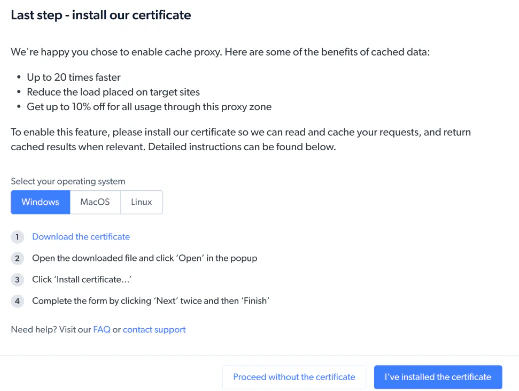
 开启后,我们将引导您完成缓存代理工作所需的一些说明。
**您有两个选项可供选择:**
开启后,我们将引导您完成缓存代理工作所需的一些说明。
**您有两个选项可供选择:**
 ***
## 高级选项:
### 100% 正常运行时间 / 自动故障转移
100% 正常运行时间(或自动故障转移)通过免费提供 100% 的连接和持续的高性能水平带来立竿见影的价值。 P此外,您无需对代码/工作流程进行任何更改。
如果我们的系统检测到问题,例如连接问题或某个 IP 其中的 GEO 与您在购买该 IP 时要求的不完全相同,我们将自动通过与原始 IP 完全相同的其他 IP 处理您的路由请求。
为了向我们的客户提供无缝体验,会产生一些例外情况:
* 如果您在请求中指定了 IP,我们不会分配回退 IP
* 100% 正常运行时间不会中断实时连接。 如果需要回退,它将在建立下一个连接后继续参与
### 启用 100% 正常运行时间 / 自动故障转移
只需将开关切换到“开启”
***
## 高级选项:
### 100% 正常运行时间 / 自动故障转移
100% 正常运行时间(或自动故障转移)通过免费提供 100% 的连接和持续的高性能水平带来立竿见影的价值。 P此外,您无需对代码/工作流程进行任何更改。
如果我们的系统检测到问题,例如连接问题或某个 IP 其中的 GEO 与您在购买该 IP 时要求的不完全相同,我们将自动通过与原始 IP 完全相同的其他 IP 处理您的路由请求。
为了向我们的客户提供无缝体验,会产生一些例外情况:
* 如果您在请求中指定了 IP,我们不会分配回退 IP
* 100% 正常运行时间不会中断实时连接。 如果需要回退,它将在建立下一个连接后继续参与
### 启用 100% 正常运行时间 / 自动故障转移
只需将开关切换到“开启”
 您还可以通过 API 开启/关闭 100% 正常运行时间功能。
### 无限带宽
您可以通过在区域详情中选择“无限带宽”来设置区域无限带宽。
启用无限带宽会增加额外成本。
数据中心 IP 无限带宽的可接受使用(或合理使用)定义为每个 IP 每月最多100GB。
传输量是跨 IP 累积的,因此要用 100GB 乘以 IP 的数量。
例如:您有两个 IP,因此 200GB 可以用于任何 IP。
当您每月每个 IP 超过 100GB 时,将按每 GB 收取超额费用。
超出合理使用范围会增加超额收费成本。
您还可以通过 API 开启/关闭 100% 正常运行时间功能。
### 无限带宽
您可以通过在区域详情中选择“无限带宽”来设置区域无限带宽。
启用无限带宽会增加额外成本。
数据中心 IP 无限带宽的可接受使用(或合理使用)定义为每个 IP 每月最多100GB。
传输量是跨 IP 累积的,因此要用 100GB 乘以 IP 的数量。
例如:您有两个 IP,因此 200GB 可以用于任何 IP。
当您每月每个 IP 超过 100GB 时,将按每 GB 收取超额费用。
超出合理使用范围会增加超额收费成本。
 ### 端口
默认情况下,端口 80 和 443 可用,支持 HTTP 和 HTTPS 协议。
下表按端口显示了支持的协议:
| 端口 | 协议 |
| ----- | -------------- |
| `80` | HTTP 和 HTTP 连接 |
| `443` | HTTPS |
Bright Data 可以根据要求支持其他端口。 每一项支持新端口的请求将遵循专门的额外合规流程,由 Bright Data 的合规团队执行。
如果您需要额外的端口权限,可以联系 Bright Data 支持团队。
激活前需要 Bright Data 合规性审查的端口示例:
| 端口 | 协议 |
| ------ | ----- |
| `8443` | HTTP |
| `8243` | HTTPS |
***
### 端口
默认情况下,端口 80 和 443 可用,支持 HTTP 和 HTTPS 协议。
下表按端口显示了支持的协议:
| 端口 | 协议 |
| ----- | -------------- |
| `80` | HTTP 和 HTTP 连接 |
| `443` | HTTPS |
Bright Data 可以根据要求支持其他端口。 每一项支持新端口的请求将遵循专门的额外合规流程,由 Bright Data 的合规团队执行。
如果您需要额外的端口权限,可以联系 Bright Data 支持团队。
激活前需要 Bright Data 合规性审查的端口示例:
| 端口 | 协议 |
| ------ | ----- |
| `8443` | HTTP |
| `8243` | HTTPS |
***