> ## Documentation Index
> Fetch the complete documentation index at: https://brightdata-ipv6-release.mintlify.site/llms.txt
> Use this file to discover all available pages before exploring further.

# Bright Data's API 令牌

Bright Data API 令牌是一种在通过 API 向 Bright Data 发送请求时替换您的证书（即电子邮件地址和密码）的安全方法。使用 API 需要 API 令牌，这样可以始终确保您的账户凭证安全可靠。

## 生成 API 令牌

<Steps>
  <Step title="登录">
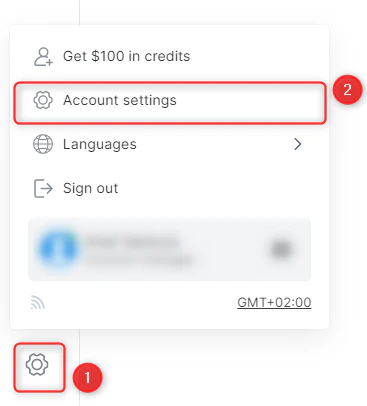
    登录到 Bright Data 的控制面板。导航到您的账户设置

    <Frame>
      <img src="https://mintcdn.com/brightdata-ipv6-release/I-B63f0As5k5UeY2/images/api-reference/unlocker/api_token/account-settings.png?fit=max&auto=format&n=I-B63f0As5k5UeY2&q=85&s=09f027cc710e963021e1adc141736a94" alt="account-settings.png" width="367" height="406" data-path="images/api-reference/unlocker/api_token/account-settings.png" />
    </Frame>
  </Step>

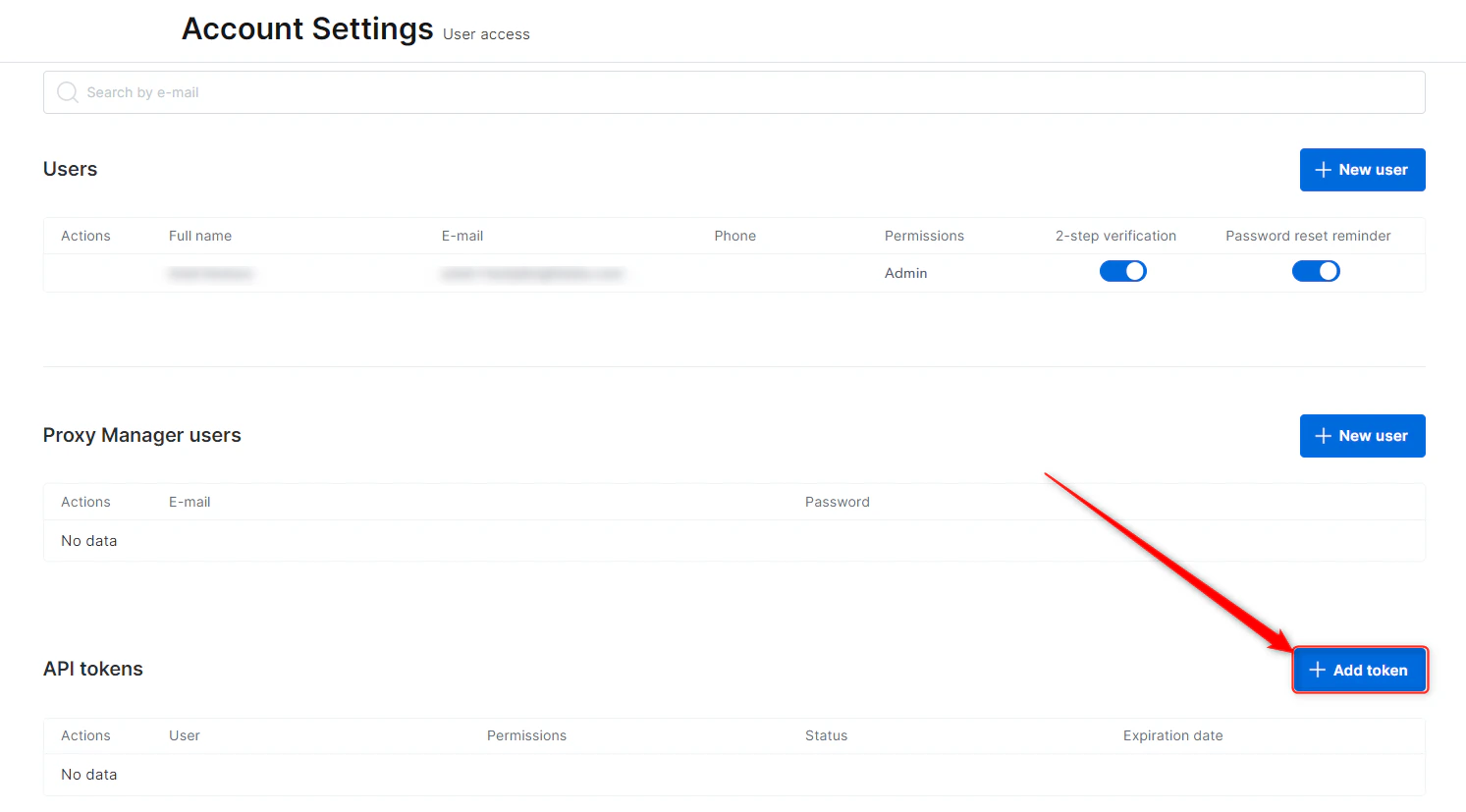
  <Step title="点击添加令牌">
    <Warning>
      If the 'API tokens' section is not visible, switch to your **admin account**. You need to be logged in as admin to generate an API token.
    </Warning>

    <Frame>
      <img src="https://mintcdn.com/brightdata-ipv6-release/I-B63f0As5k5UeY2/images/api-reference/unlocker/api_token/add-token.png?fit=max&auto=format&n=I-B63f0As5k5UeY2&q=85&s=b758592197ecd3cd5ff7d21dee10f1e2" alt="add-token.png" width="1493" height="827" data-path="images/api-reference/unlocker/api_token/add-token.png" />
    </Frame>
  </Step>

  <Step title="设置令牌到期日期">
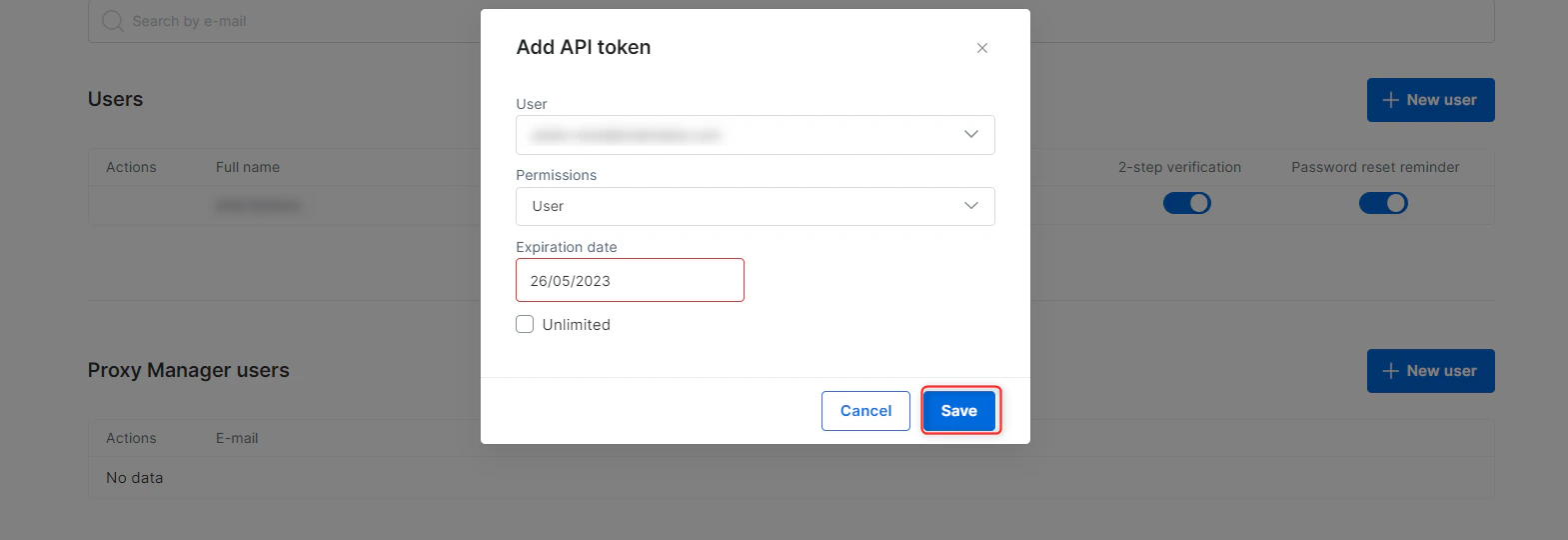
    设置令牌到期日期（或选择 “无限制”）、许可权限，选择所要生成令牌的用户，然后点击 “保存”

    <Frame>
      <img src="https://mintcdn.com/brightdata-ipv6-release/I-B63f0As5k5UeY2/images/api-reference/unlocker/api_token/save-token.png?fit=max&auto=format&n=I-B63f0As5k5UeY2&q=85&s=6912ef0264c97488f522287f8a34c87f" alt="save-token.png" width="1569" height="540" data-path="images/api-reference/unlocker/api_token/save-token.png" />
    </Frame>
  </Step>

  <Step title="保存您的令牌">
    <Warning>
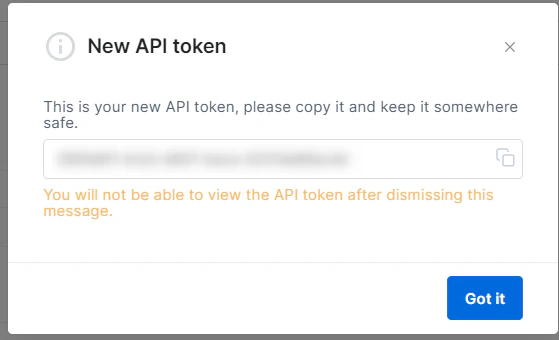
      您的令牌生成之后，务必将其保存，因其仅供一次性使用（仅限查看！）
    </Warning>

    <Frame>
      <img src="https://mintcdn.com/brightdata-ipv6-release/I-B63f0As5k5UeY2/images/api-reference/unlocker/api_token/new-api-token.png?fit=max&auto=format&n=I-B63f0As5k5UeY2&q=85&s=8e8b2e067b3bf529e68fdd404ce105bb" alt="new-api-token.png" width="559" height="340" data-path="images/api-reference/unlocker/api_token/new-api-token.png" />
    </Frame>
  </Step>
</Steps>

<Tip>
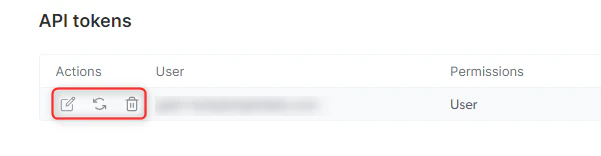
  创建令牌之后，您将无法再次查看，但是，您仍然可以在任何时候对其刷新、更改其到期日期以及将其撤消。

  <Frame>
    <img src="https://mintcdn.com/brightdata-ipv6-release/I-B63f0As5k5UeY2/images/api-reference/unlocker/api_token/token-edit-buttons.png?fit=max&auto=format&n=I-B63f0As5k5UeY2&q=85&s=17aab4f9b31ce7950e17bdabe94066e7" alt="token-edit-buttons.png" width="601" height="156" data-path="images/api-reference/unlocker/api_token/token-edit-buttons.png" />
  </Frame>
</Tip>